Series of 2-4 lessons
- This unit is an introduction to pictograms and looking at how they can be used to represent data. As with all units, you may want to adapt the content to suit topics being studied in the classroom.
Objectives
- To understand that data can be represented in picture format.
- To contribute to a class pictogram.
- Children can discuss what the pictogram shows.
P Levels 7/8 Information Technology
- Select media to convey information
- Present information by combining media, with support
- Present information and ideas by combining media independently
Resources
- 2Connect tool within Purple Mash
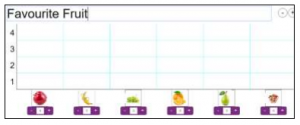
- 2Count Pictogram – Favourite Fruits. To open this, open the 2Count tool then click on the New File button
and select the ‘Fruit’ file from the list of options: - Make sure that you have the Purple Mash shortcut icon ready on the desktop or tablet to save time when the children are logging in.
Series of 4-6 lessons
Activities
Detailed lesson Plans from Purple Mash can be found here:
https://www.2simple.com/sites/default/files/media/Unit%201.3%20Pictograms.pdf
This Purple mash lesson plan contains 3 Lessons
Focus on the first two lessons ie Representing information in a picture format. And contributing to a class pictogram.
Note the first activity of how to get to school could be replaced with “things we travel in” or favourite fruit