
Series of activities – open ended discovery – Teacher Sheet
Pupils use the iPad apps to play with remote toys and devices to learn to create outcomes. E.g. it moves turns around and goes over there. They may understand that learn how to spot where they went wrong.
Linked to Blue Bot programming in years R-6
Objectives
- I can control an onscreen robot (Dinosaur).
- I can make it go to a specific point.
- I may be able to change the way I control it when it doesn’t go where I want to.
ELG, P Levels and NC Objectives
ELG 15 Technology: children recognise that a range of technology is used in places such as homes and schools. They select and use technology for particular purposes
P Levels p 7/8
- Follow a short sequence of instructions to operate a digital device
- Give simple instructions to control a range of digital devices
- Understand that digital devices can be controlled in different ways
- Appreciate that changing instructions can change outcomes
- Can identify the steps of a known task
- Try alternative approaches in order to achieve a goal
- Understand that we control digital devices by giving them instructions.
- Can list the steps of a known task in order
- Independently follow a short sequence of instructions to achieve a specific outcome
- Create a short sequence of instructions to control a digital device
- Change instructions to achieve a different outcome.
Introduction to Daisy the Dinosaur iPad App
Daisy the Dinosaur – aimed at young children app for iPad. This app allows drag and drop commands on the screen to control Daisy.
In the app, players have the option to select either free-play mode or challenge mode.
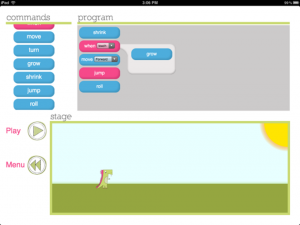
In free-play mode,
- players can choose from nine different commands that can be dragged onto the program section of the screen.
- In both modes, an arrow pops up as you drag the commands to give a visual cue about where the command pieces should be placed.
- Some commands have multiple options, such as move, which can be specified as forward or backward,
- and when there are multiple options these appear as a drop down menu on the piece for the main command.
- Players can combine the nine available pieces in a wide array of different patterns to create an easy or complicated series of motions for Daisy to complete when the player presses play.
In challenge mode,
- players are given a goal and only a limited number of command pieces.
- The challenge is to figure out how to arrange the available commands to complete the assigned task. These challenges start out quite easy and slowly get a bit more complicated.
- There are only a few such challenges available but they are primarily intended to introduce the player to the available commands and build their confidence with the commands
- though they do require some reading, which may require more support.
Options
The game has no teacher/control options and the App does not have any music or sounds so it will not read the instructions, initially the teacher/support may need to read instructions and work with the pupils.
Daisy the Dinosaur
Activities to get started
- Model how to open the app – perhaps do one of the activities
- Allow the pupils to have a go as soon as they want to.
- Work through the levels individually or in pairs.
- Work through some levels on the board.
Teacher sheets
From Somerset eLIM – a series of sheets that may be useful.
More Simple getting started Activities
- Make Daisy – Move forwards 3 times
- Make Daisy – Spin 5 times
- Make Daisy – Jump 3 times
- Make Daisy – move forward then Jump 3 times
- Make Daisy – move forward, jump then spin.
- Can you make Daisy Dance?