Series of 4-6 lessons
- For these s
 essions, the children will need to have their own individual logins set up in Purple Mash
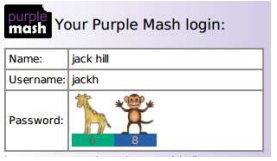
 - These can be made very simply with a two animal password, Login can be printed as a card and displayed for adults to see.
- The children will be creating their own avatar. They will be creating a picture using Paint Projects. They will be using the Online Work area. They will be searching Purple Mash.
Note: If you are currently using a single login per class or group and would like to set up individual logins yourself, then please see our guide to doing so at Create and Manage Users. Alternatively, please contact support at support@2simple.com or 0208 203 1781.
Check with the Purple Mash Administrator in your school (usually the coordinator) if you need to change the children’s passwords. You can create picture passwords for the younger children but if you’re not sure how to do this just give the 2Simple office a call and we can talk you through it or set them up for you!
Objectives
- To log in safely.
- To start to understand the idea of ‘ownership’ of their creative work.
- To learn how to find saved work in the Online Work area and find teacher comments.
- To start to add pictures and text to work.
P Levels 7/8 Information Technology
- Create their own simple digital content
- Select media to convey information
- Present information by combining media, with support
- Present information and ideas by combining media independently
- Demonstrate understanding that information and media can be stored on a digital device
Resources
- Individual login cards for the children. These can be made using the Print Pupils Login icon in the Admin section.
- Purple Mash avatar creator; this is opened by clicking on the avatar near the top right of the
 screen.
 - Create your own avatar in advance to be able to show it to the children.
- Make sure that you have the Purple Mash shortcut icon ready on the desktop or tablet to save time when the children are logging in.
Series of 4-6 lessons
Activities
Detailed lesson Plans from Purple Mash can be found here:
This lesson plan contains 4 Lessons There is plenty of activities to last several more as the pupils will be unfamiliar with Purple Mash.
- Safe Logins
- My Work Area
- Purple Mash Topics
- Purple Mash Tools
The pupils will be creating their own avatar. They will be creating a picture using Paint Projects. They will be using the Online Work area and be able to search Purple Mash. Focus on the first two lessons ie Logging on and drawing a picture.